Best Curved Monitors
Best Curved Monitors not only boost your gaming and work setups but also eliminate the unsightly distractions of flat screens. If you’re tired of eye strain and dull visuals, our expert guide offers a refreshing look at gaming monitors and immersive curved screens, promising a vibrant and engaging experience. Discover how cutting-edge technology can transform your viewing enjoyment and dramatically elevate your daily tasks as you dive into our detailed review.
Contents
- Top 5 Curved Monitors:
- 1. Samsung Odyssey Neo G8 – Best overall curved monitor
- 2. Corsair Xeneon Flex 45WQHD240 – Best Bendable Curved Gaming Monitor
- 3. MSI MPG 341CQPX QD-OLED – Best Ultrawide Curved Monitor
- 4. Gigabyte G27FC – best value curved monitor
- 5. Dell S3422DWG – Best Budget Curved Monitor
- Things To Consider When Buying a Curved Monitor:
- The Science of Curvature: How it Affects Viewing Experience
- The Geometry of Curved Screens
- Understanding Aspect Ratios and Screen Sizes
- The Visual Impact: Immersion vs. Distortion
- Evaluating Visual Comfort and Eye Strain
- The Role of Curved Monitors in Gaming and Productivity
- Resolution and Refresh Rates: A Balancing Act
- The Importance of Pixel Density
- How Refresh Rates Influence Performance
- Connectivity and Compatibility: Ensuring Seamless Integration
- Types of Connections and Ports Explained
- Compatibility with Multiple Devices
- Price vs. Performance: Making the Right Investment
- Analyzing Cost-Effectiveness in Curved Monitors
- Determining Your Usage Needs for Optimal Value
- To wrap up
Top 5 Curved Monitors:
1. Samsung Odyssey Neo G8 – Best overall curved monitor

Experience gaming in a whole new way with the Samsung Odyssey Neo G8. As our top general curved choice, the monitor offers a terrific mix of performance and aesthetics.
Enjoy amazing 4K resolution at an unbelievable 240Hz refresh rate. Together, this combination brings to life a seamless, clear picture that amplifies line-of-sight onscreen gaming action. You’ll experience very little ghosting during gaming, so you can play at your best without being distracted. It is also 1000R curved, wrapping around your field of view to make you feel like you are in the game.
Mini LED backlight gives bright colors pop. It also has a stunning peak brightness of 1411 nits, and delivers fantastic HDR. Creative tasks become seamless with 99% sRGB and 92% DCI-P3 coverage. With accurate and vibrant colors, you’ll be able to edit videos or create graphics with confidence.
For me, one of the highlights is the beautiful design. A glossy white finish looks fantastic, and the sandblasted metal base lends strength. It’s well made and has a beautiful robust feel, it would add luxury to any gamers setup.
However, this monitor isn’t going to be for every wallet, it’s a top end option for serious gamers. But if it’s best-of-the-best performance and eye-candy visuals that you’re after, then this investment is worth it.
Functionality x Aesthetic I seriously love how well the Samsung Odyssey Neo G8 is able to mesh these two in a not so good way.
2. Corsair Xeneon Flex 45WQHD240 – Best Bendable Curved Gaming Monitor

Corsair Xeneon Flex 45WQHD240 Break the rules of gaming with the Corsair Xeneon Flex 45WQHD240. This special monitor integrates flexibility with power, becoming the ultimate bendable curved gaming monitor on the market today. The screen can be easily rotated from flat to an up to 800R curve for more comfortable gaming.
Topping it all is the beautiful OLED panel, which renders incredible contrast and vivid colours. The 240 Hz refresh rate makes this perfect for fast-paced games, with great motion clarity when the action gets frenetic. AND because of the low input lag you’ll always stay one step ahead. Adaptive Sync improves gameplay by eliminating screen tearing for incredibly fluid gaming no matter what’s happening in-game, it is also G-Sync compatible with Nvidia G-Sync.
My favourite is how it seems to be a perfect fit for both gamers and productivity workers. It’s no slouch in the entertainment department either, with a wide-screen aspect ratio and 3440×1440 resolution that not only gives you a ton of screen space to work with. Bend and straighten the monitor with ease, thanks to hand holds on both sides.
Until now I’d been using one of those travel battery powered printers, and these are obviously better by far.Only minor caveats: The pixel density isn’t quite as eye-searing as with smaller models, but the scale more than makes up for that with a glorious visual experience. HDR performance could do with a little tweaking, too. These objections do not seriously detract from its brilliance, although they deserve a hearing.
Huge test: A stunning monitor we can’t take our eyes off.
3. MSI MPG 341CQPX QD-OLED – Best Ultrawide Curved Monitor

For those who thirst after immediate gratification from a beautifully clear and shock-sharp display, the MSI MPG 341CQPX QD-OLED won’t disappoint. This ultrawide monitor will change the way your work and play. Its 34-inch curved screen envelops you, so multitasking is easy in multiple windows side by side.
A stand out feature would be the KVM switch. There is no hassle about transitioning from one device to another. KVM makes your workflow convenient when managing multiple systems. What’s more, its USB-C port is 90W power delivery enabled, so you can plug in laptops with ease. Enables your device while you to watch a video and see the texts clearly at the same time without clutter your desktop with cords.
Gaming enthusiasts will especially appreciate its 240Hz refresh rate. Screen is protected while fast-action gaming, Operate and move screen without any delay. You’ll love its motion handling with the added benefit that frames never look blurry or dull. And with the QD-OLED technology color pops like you’ve never seen.
The Dell Alienware model boasts a higher resolution, although MSI has the edge with special features. Those wonderful overall capability is still there, even if it’s not quite as detailed. The only other downside I could see is that the monitor may feel a bit overboard for the average user. But real gamers and those who work hard will enjoy this thing to no end.
The great thing about this monitor is that I can easily bridge work/play with it. When you’re able to bring out the best of your imagination, you will feel more creative and be inspired to create something new.
4. Gigabyte G27FC – best value curved monitor

Step into a new realm of gaming with this 27 inch GIGABYTE G27FC. This 27-inch curved monitor While the response time may not be suited to competitive play, all other details are of the kind that wins gamers over. And thanks to its crisp 1080p resolution and speedy 165Hz refresh rate, PC games will look great running at ultraframerates.
One of its best features is its curved design that draws you in. Wider view, winning play – Keeps your eyes on the prize, your head in the game. And with fluid motion, the G27FC keeps up with all the action.
Another good thing: It’s well built — not sturdily crafted, but not entirely an eyesore. The HDR10-compatible projector may not have the best of luminous specs, but when it comes to performance, you won’t mind. At this price point, you’re not going to find many competitors with those features.
The colors might not pop as bright as you’d want, but they’re fine for gaming in most circumstances. It’s not enough to be a deal breaker, especially given how well the monitor performs with different genres.
What I love most about the G27FC is how attainable it makes high-level gaming. arch with an excellent quality-price relation, it is perfect for gaming with an optimal cost-effectiveness ratio whether you are playing sports, shooters, adventure or brotherhood games.
Find out what makes the Gigabyte G27FC one of the best curved monitors around.
5. Dell S3422DWG – Best Budget Curved Monitor
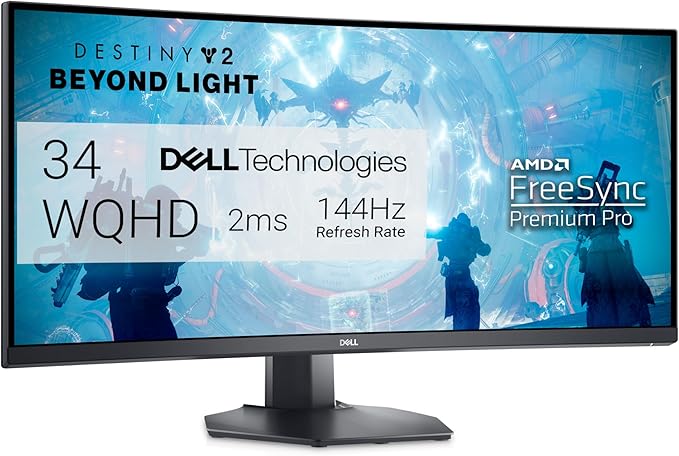
Affordable gaming gets a fresh face with the Dell S3422DWG. It’s a solid value for a curved 34-inch display, but it’s by no means a cheapie. Action’s happening all around you – you want a monitor that won’t draw you further into the midst of it all, and the 1800R curve of this one will do just that.
Get high-resolution graphics with the 1440p resolution. Although color quality is not as good as high-end models, it still has a healthy contrast ratio, so it can give you deep blacks and bright whites. The screen does very well in brightly lit environments, it goes to great lengths to combat glare, so you won’t have any issues with it when you are gaming, but it is also mindful of your eyesight.
VRR support is another plus (it will eliminate screen tearing and should make gameplay feel smoother). In heated sequences, this feature proves quite useful. Fast-moving objects may exhibit a bit of blurring and smearing in some pictures, but the gaming experience is still good, especially for the budget minded.
But narrow viewing angles are only a minor downside. Colours can look washed out from the sides, although mercifully the curve cuts down on this quite a lot when seen from head-on. Co-op gameplay may not necessarily sparkle here, but solo players can love how engrossing this monitor can be.
The thing that impresses me the most about this monitor is how it strikes a fine balance between price and performance. People who want a reliable curved alternative have a lot to like about the Dell S3422DWG. It shows itself to very well be in the running for the best value curve monitor available. If you’re curious to see how a good display can possibly be priced so affordably, give it a look.
Things To Consider When Buying a Curved Monitor:
Curved monitors offer a unique viewing experience that can enhance your productivity and gaming enjoyment. As you contemplate the purchase of one, it’s crucial to consider several key factors that will impact your overall satisfaction. From screen size and resolution to curvature degree and panel technology, understanding these elements will help you make an informed decision tailored to your specific needs. This guide will walk you through the important aspects to evaluate, ensuring that you choose the perfect curved monitor for your setup.
The Science of Curvature: How it Affects Viewing Experience
The curvature of a monitor significantly enhances your viewing experience by creating a more immersive visual field. This shape reduces glare and distortion at the edges, allowing for consistent image quality across the screen. Studies indicate that curved displays can lead to less eye strain during extended use, as the design closely follows the natural curvature of your eyes, promoting a comfortable focus. Engaging with media on a curved monitor can foster deeper involvement and enjoyment due to the encompassing effect that draws you into the action.
The Geometry of Curved Screens
Understanding Aspect Ratios and Screen Sizes
Aspect ratio refers to the proportional relationship between the width and height of your monitor, influencing both visual space and detail. Standard ratios include 16:9 for widescreen and 21:9 for ultra-wide formats. A wider aspect ratio is particularly advantageous for gaming and productivity tasks, as it provides additional horizontal screen real estate without sacrificing vertical space. Pay close attention to screen sizes as well; larger screens create more immersive experiences, but they also require sufficient desk space and appropriate viewing distances to optimize comfort and efficacy.
In choosing the right aspect ratio and screen size, consider your typical use cases. For instance, gamers often prefer 21:9 displays because they allow for a broader field of view, giving an edge during gameplay. Alternatively, those focused on content creation might benefit from 16:9 ratios, which align better with standard video resolutions. Additionally, larger screens, such as 34 inches and above, can enhance productivity by minimizing the need to switch between applications, but positioning and desk space become critical aspects to accommodate. Balancing these factors ensures you maximize the potential of your curved monitor while maintaining a comfortable work environment.
The Visual Impact: Immersion vs. Distortion
Curved monitors promise a more immersive experience, drawing you into the action or enhancing your workflow. However, this visual magic can sometimes lead to distortion, especially if the curvature doesn’t match your viewing requirements. A curve that is too aggressive may warp the image, whereas a gentle curve can seamlessly envelop your field of vision, reducing peripheral distractions and enhancing focus. This balance between immersion and distortion is key to selecting a monitor that elevates your everyday use without compromising clarity.
Evaluating Visual Comfort and Eye Strain
Choosing a curved monitor involves assessing how its curvature impacts visual comfort and eye strain. A monitor with an appropriate curvature reduces the need for your eyes to constantly adjust focus, allowing for longer viewing periods without discomfort. Look for features like flicker-free technology and blue light reduction to further minimize eye strain during prolonged use.
The Role of Curved Monitors in Gaming and Productivity
Curved monitors play a significant role in both gaming and productivity environments by offering an expansive field of view. For gamers, a curved display enhances spatial awareness, allowing you to track enemies and react faster, thanks to a more immersive surround feel. In productivity, they can create a more cohesive workflow by accommodating multiple windows without breaking visual continuity, effectively increasing your efficiency.
In gaming, curved monitors often feature a refresh rate of 144Hz or higher, reducing motion blur during fast-paced action and providing smoother gameplay. Brands like Samsung and Alienware have developed models that cater specifically to gamers, ensuring a snug fit for your peripherals and offering enhanced color accuracy. On the productivity side, a curved display can transform a multi-tasking workspace; studies have shown that users experience up to a 33% increase in productivity when using a wider display area that minimizes eye movement and distraction. With the right model, you can take full advantage of both your gaming and work environments, creating an exceptional experience tailored to your needs.
Resolution and Refresh Rates: A Balancing Act
Finding the right balance between resolution and refresh rates can dramatically affect your overall experience with a curved monitor. Higher resolutions offer sharper images and greater detail, while refresh rates contribute to smoother motion and enhanced fluidity in fast-paced environments. Ideally, your choice should align with your primary use—whether gaming, professional design, or general consumption—ensuring that neither resolution nor refresh rate becomes a limiting factor for your needs.
The Importance of Pixel Density
Pixel density plays a vital role in the clarity of your display. Measured in pixels per inch (PPI), higher pixel density means more detail and a sharper image, important for tasks like photo editing or watching high-definition content. A monitor with a resolution of 2560 x 1440 (QHD) on a 27-inch curved screen provides an impressive pixel density of around 109 PPI, making your images pop while minimizing the risk of pixelation.
How Refresh Rates Influence Performance
Refresh rates directly affect the smoothness of your visuals, especially in fast-paced scenarios. A standard monitor typically operates at 60Hz, but gaming monitors may feature refresh rates of 120Hz, 144Hz, or even higher, providing a significant advantage in competitive play. With a higher refresh rate, motion blur is reduced, allowing you to react faster in critical moments, whether you’re navigating a high-speed race or engaging in FPS combat.
A monitor with a higher refresh rate, like 144Hz, refreshes the image on screen every 6.94 milliseconds, compared to 16.67 milliseconds for a standard 60Hz display. This improvement in response time can lead to a smoother visual experience and reduced motion artifacts, which is especially beneficial in rigorous gaming sessions. For gamers, a higher refresh rate not only enhances enjoyment but can also be the difference between winning and losing, as it provides a competitive edge by delivering more immediate feedback on your actions. To truly capitalize on this speed, however, ensure your graphics card can support the desired refresh rates to avoid bottlenecks in performance. With the right combination of resolution and refresh rate, your curved monitor can transform your viewing experience into something remarkable.
Connectivity and Compatibility: Ensuring Seamless Integration
Evaluating connectivity options and device compatibility is crucial for ensuring that your new curved monitor integrates seamlessly into your setup. Pay attention to the available ports and connections that will allow you to easily connect your monitor to your computer, gaming console, or other peripherals. The right connectivity options can enhance the performance of your monitor and improve your overall user experience.
Types of Connections and Ports Explained
Understanding the various connections and ports available on curved monitors can simplify your decision-making process. Here’s a breakdown of some common types:
Compatibility with Multiple Devices
Your curved monitor should offer flexibility to connect with multiple devices effortlessly. Whether you use a desktop, laptop, gaming console, or even a streaming device, having a monitor that supports various connections is beneficial. Look for monitors with at least two HDMI ports and an additional DisplayPort or USB-C connection, which caters to most users’ needs while allowing for future expansion.
By ensuring compatibility with a variety of devices, you streamline usage scenarios, whether for work or entertainment. Connecting your gaming console, office laptop, or home theater system becomes simple and efficient. For instance, with multiple HDMI ports, you can easily switch between devices without constantly plugging and unplugging cables. Keeping your workspace versatile not only optimizes your experience but also enhances productivity. The right connections empower you to exploit your curved monitor’s full potential.
Price vs. Performance: Making the Right Investment
Budget constraints heavily influence your choice when selecting a curved monitor. A higher price tag often correlates with superior performance features, such as better resolution, advanced refresh rates, or enhanced color accuracy. However, don’t overlook budget-friendly options that still deliver impressive visuals and functionality. Weighing the performance benefits against your financial investment will help secure the right monitor that fits both your needs and your wallet.
Analyzing Cost-Effectiveness in Curved Monitors
Cost-effectiveness goes beyond the initial price; it involves considering long-term value and performance. When evaluating a curved monitor, factor in durability, warranty, and customer support. Monitors that may seem pricey upfront could save you money later through lower replacement costs and superior reliability. A reliable brand with solid reviews can provide assurance that you’re making a wise investment.
Determining Your Usage Needs for Optimal Value
Understanding how you plan to use the monitor is important for ensuring you get the best value. Whether for gaming, professional design work, or general multimedia consumption, your specific needs will guide you towards features that enhance your experience. For instance, if gaming is your primary use, a monitor with a high refresh rate and low response time will deliver a smoother experience. Alternatively, for graphic design, you’ll want to prioritize color accuracy and resolution.
Your usage patterns directly influence the type of monitor that works best for you. Gamers often benefit from features like G-Sync or FreeSync compatibility, which reduce screen tearing during fast-paced action. If you’re involved in creative tasks such as video editing, investing in a curved monitor with superior color accuracy—like those supporting 99% sRGB—can elevate your work quality. For general use, a mid-range monitor that balances decent resolution and refresh rates may suffice, proving an efficient and sensible investment for varied daily tasks.
To wrap up
With these considerations, you can make a well-informed decision when purchasing a curved monitor. Evaluate factors like screen size, resolution, curvature, and refresh rate to ensure it meets your specific needs, whether for gaming, professional work, or multimedia consumption. Additionally, pay attention to connectivity options and ergonomic features to enhance your overall experience. By taking the time to assess these elements, you will ensure that your investment in a curved monitor is both satisfying and beneficial for your setup.
